KRPANO Resource Analyser tool download and restore KRPano panorama from websites
Multiple scenes download and restore
From KRPANO Resource Analyser tool version 1.3.0, it provides a more convenient way to download and restore KRPano panorama. Only need to click the right mouse button, you can restore all the panoramas without any other no additional operations.
For example, there is a KRPano website:
http://vr.firstep.cn/dawa/lvyou/pano/honghaitanlangdao/tour.html
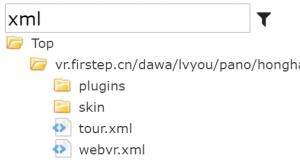
- First of all, type XML in the filter box of Resource Viewer, we can obtain all the XML file for this site:
- Open tour. xml file, we can find there has some scene information
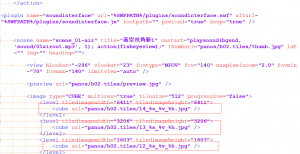
Note: For the real world KRPano project, the primary XML file may not named tour. xml, so you can use the context menu “Open File” to check whether the XML has or tags, which indicates the primary XML file. Then right at the file, select “Download to restore all the panoramas in the XML” in the context menu to download and restore all the panoramas.
- Right click at the tour. xml, select “Download to restore all the panoramas in the XML”
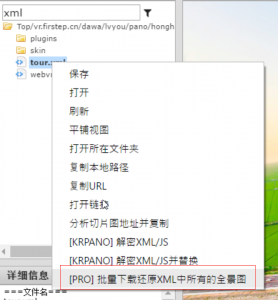
Select a folder to save the panoramas
Click OK to continue
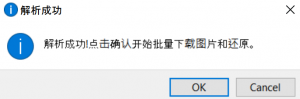
A command line window will pops up to indicate the download is started
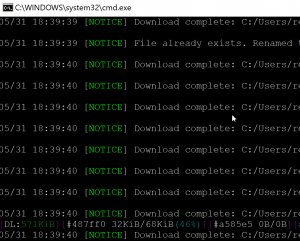
After finish, all the panoramas will be saved in the folder
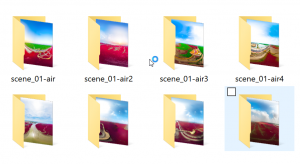
Tip:
1. For some websites (such as 720yun, expoon, ivrpano, and so on), the software has already optimize the download and restore process, so there’s no need to manually locate the primary XML file. You can right-click anywhere in the software to download and restore panoramas.
2. The software will automatically downloads the highest level of panorama, so that the picture will be very large (30M~200M).
3. Download panorama currently are tested with the following famous KRPano websites. Other untested websites can follow the previous instructions to download and restore. If you have any questions, you can join the QQ group for KRPano Resource Analyser Tool : 571171251
720yun
http://720yun.com/
ivrpano
https://www.ivrpano.com/
expoon
http://www.expoon.com/
720think
https://www.720think.com/
airpano
http://www.airpano.ru
3vjia
http://www.3vjia.com/
vr-factory
http://www.vr-factory.com/
shiw-vr
http://www.shiw-vr.com
A single batch download and restore
Download sections
KRPano resource analysis tool supports batch download panoramic sections of the Web site, for example, the following Web sites:
http://vr.firstep.cn/dawa/lvyou/pano/honghaitanlangdao/tour.html
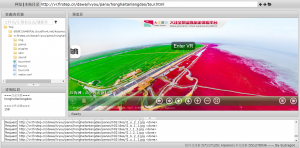
- first of all we in the filter box, type XML in a resource Viewer, view the XML file for the site:
- tour. in the XML file, you can see the sections address looks like this:
- four different images with different resolutions for the address, L4 highest resolution L1 resolution minimum.For example L3 the following sections address, enter in the URL box:
http://vr.firstep.cn/dawa/lvyou/pano/honghaitanlangdao/panos/h02.tiles/l3_%s_%v_%h.jpg

The sections of the path is a relative path of the site.Address changes can refer to the log as an absolute path:

- when the input is complete, click Enter.
After clicking the enter, KRPano resource analysis tool based on the provided address, analyzing all the sections, bulk downloads.According to the different speeds and download speeds will vary, in the log window, you can view the progress of the download
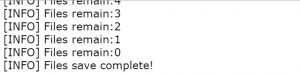
- after the download is complete, you can view the resource Viewer, you can select the batch to save or view a single picture
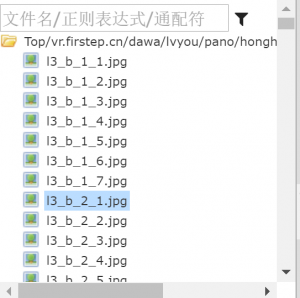
Restore the panorama
KRPano resource analysis tool you can one-click revert to download sections of a spherical figure.
The operation is very simple, just downloaded in the previous step on the sections of the catalog, click the right mouse button, you can choose to restore the panorama.
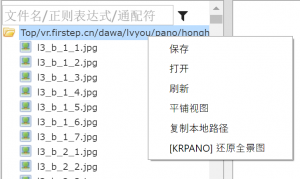
After clicking, all pictures KRPano resource analysis tool will automatically stitching, revert to the spherical figure.In the log window, you can see the restore progress, when the restore is finished, prompt window will pop up, you can open the folder to view the restored pictures.

Related links
Free download:
https://pan.baidu.com/s/1bo2xfGz
Version history:
http://www.krpano.tech/archives/82
Basic instructions:
http://www.krpano.tech/archives/139
Description link to download the template:
http://www.krpano.tech/archives/476
Decrypt function:
http://www.krpano.tech/archives/150
Encrypt function:
http://www.krpano.tech/archives/187
Analysis group: 571171251
This post was published on: http://www. krpano. tech/archives/166
Posted by:Leapever Software
Reprinted please specify the source, thank you!