HTML页面可以通过 video 标签播放网络和本地视频,结合浏览器全屏接口实现最大化播放,并在全屏时锁定横屏获得更好的观看体验。完成页面代码后,再通过HTML一键打包APK工具配置网络权限,即可生成支持视频播放和全屏播放的安卓APP。
如果你不了解HTML打包APK工具,想要进一步了解,可以查看官网:
HTML一键打包APK工具官网
创建视频播放页面
在HTML项目入口目录中创建 index.html,页面包含视频播放区、最大化按钮和地址加载入口。
- 视频播放:使用
video 标签加载网络或本地视频,并添加 playsinline 系列属性保证在APP内联播放。
- 最大化按钮:调用浏览器全屏接口,将播放器切换到全屏状态,兼容打包后APP的WebView环境。
- 横屏锁定:进入全屏时自动锁定为横屏,退出全屏时恢复竖屏。
- 地址加载:支持输入视频直链地址,加载不同的视频进行测试。
视频标签需要添加 playsinline、webkit-playsinline 和 x5-playsinline 属性,避免在部分WebView中点击播放时强制跳转系统播放器:
1
| <video playsinline webkit-playsinline x5-playsinline src="video.mp4"></video>
|
最大化按钮通过全屏接口把播放器容器切换到全屏,并同时处理标准接口和 webkit 前缀接口,保证在打包后的WebView中正常工作:
1
2
| if (shell.requestFullscreen) shell.requestFullscreen();
else if (shell.webkitRequestFullscreen) shell.webkitRequestFullscreen();
|
打包成APK
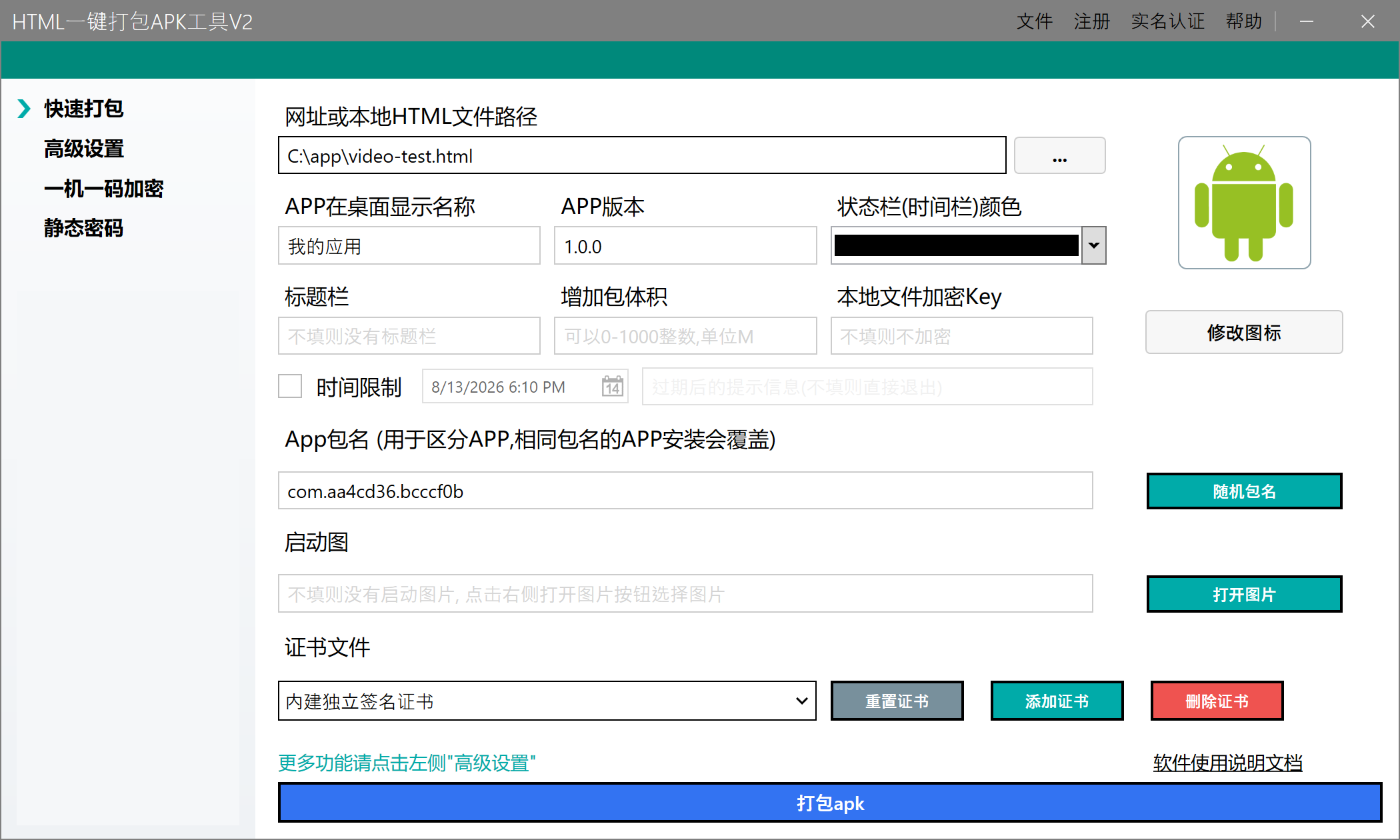
复制上述HTML代码, 保存到video-test.html文件中, 然后HTML一键打包APK工具中载入该文件, 然后点击打包生成APP即可
安装并测试功能
将生成的APK安装到安卓手机,依次测试页面中的各项功能:
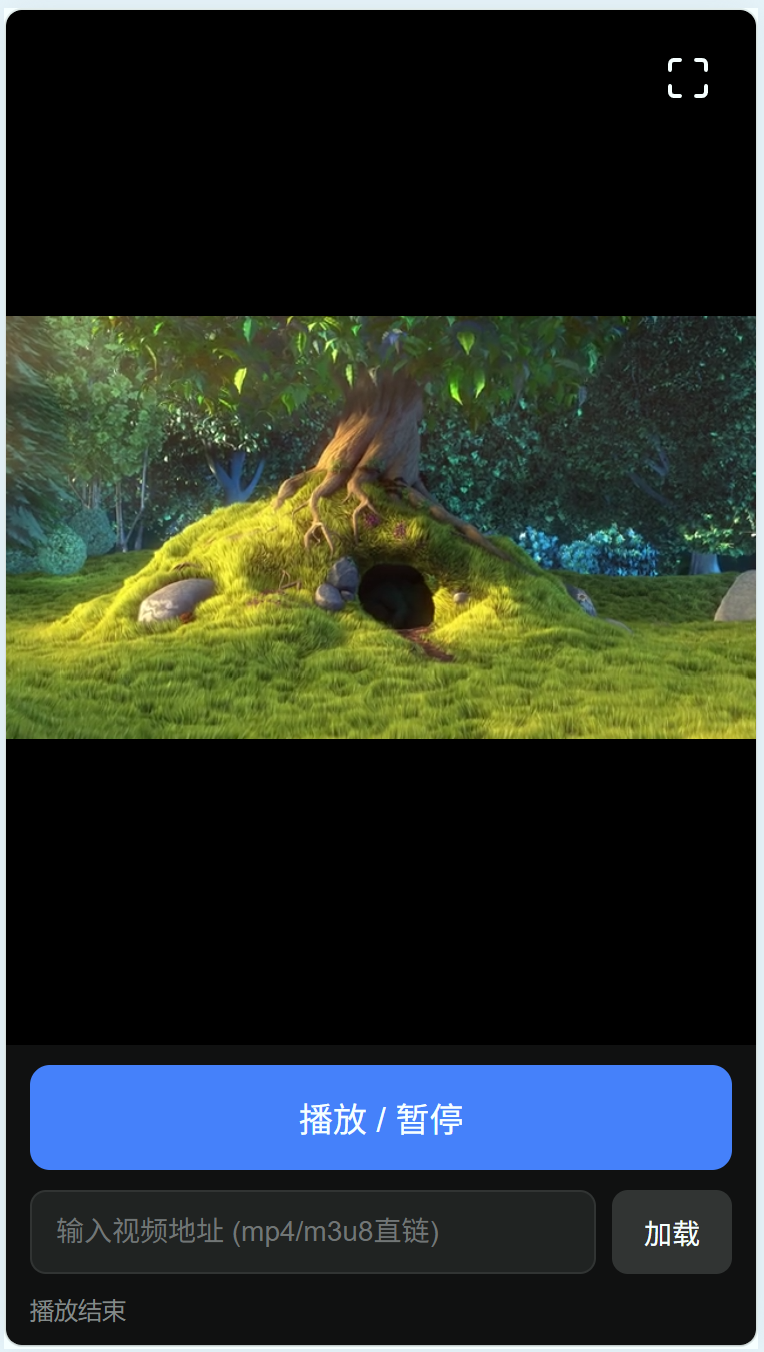
- 打开APP,确认默认视频可以正常加载,点击“播放 / 暂停”按钮可以控制播放。
- 点击右上角的最大化按钮,确认播放器进入全屏状态,按钮图标切换为还原样式。
- 在全屏状态下旋转手机,确认画面锁定为横屏;退出全屏后确认恢复竖屏显示。
- 在地址栏中输入其他mp4直链地址并点击“加载”,确认可以切换播放不同的视频。
- 拖动进度条,确认视频可以从指定位置继续播放。
为了获得最好的兼容性,视频建议使用H.264视频编码和AAC音频编码的mp4文件。部分WebView版本对HEVC、VP9等编码的支持不一致,可能出现只有声音没有画面的情况。
如果点击最大化按钮没有进入全屏,请先确认APP系统设置中没有限制横屏,并检查手机是否开启了方向锁定;如果在线视频一直无法加载,请检查打包时是否勾选了网络权限,以及视频地址是否可以通过手机浏览器直接打开。网页中的自动播放在WebView里通常需要先有一次用户交互,因此建议像示例一样提供明确的播放按钮,而不是依赖页面打开后自动播放。
一个完整的html示例代码如下:
1
2
3
4
5
6
7
8
9
10
11
12
13
14
15
16
17
18
19
20
21
22
23
24
25
26
27
28
29
30
31
32
33
34
35
36
37
38
39
40
41
42
43
44
45
46
47
48
49
50
51
52
53
54
55
56
57
58
59
60
61
62
63
64
65
66
67
68
69
70
71
72
73
74
75
76
77
78
79
80
81
82
83
84
85
86
87
88
89
90
91
92
93
94
95
96
97
98
99
100
101
102
103
104
105
106
107
108
109
110
111
112
113
114
115
116
117
118
119
120
121
122
123
124
125
126
127
128
129
130
131
132
133
134
135
136
137
138
139
140
141
142
143
144
145
146
147
148
149
150
151
152
153
154
155
156
157
158
159
160
161
162
163
164
165
166
167
168
169
170
171
172
173
174
175
176
177
178
179
180
181
182
183
184
185
186
187
188
189
190
191
192
193
194
195
196
197
198
199
200
201
202
203
204
205
206
207
208
209
210
211
212
213
214
215
216
217
218
219
220
221
222
223
224
225
| <!DOCTYPE html>
<html lang="zh-CN">
<head>
<meta charset="UTF-8">
<meta name="viewport" content="width=device-width, initial-scale=1.0, maximum-scale=1.0, user-scalable=no">
<title>视频播放测试</title>
<style>
* { margin: 0; padding: 0; box-sizing: border-box; }
html, body {
width: 100%; height: 100%;
background: #000;
font-family: -apple-system, "PingFang SC", "Microsoft YaHei", sans-serif;
overflow: hidden;
}
#player-wrap {
position: relative;
width: 100%;
height: 100%;
display: flex;
flex-direction: column;
}
#video-box {
position: relative;
flex: 1;
background: #000;
display: flex;
align-items: center;
justify-content: center;
overflow: hidden;
}
video {
width: 100%;
height: 100%;
object-fit: contain;
background: #000;
}
#btn-fullscreen {
position: absolute;
top: 12px;
right: 12px;
z-index: 20;
width: 44px;
height: 44px;
border: none;
border-radius: 8px;
background: rgba(0, 0, 0, 0.55);
color: #fff;
display: flex;
align-items: center;
justify-content: center;
cursor: pointer;
-webkit-tap-highlight-color: transparent;
}
#btn-fullscreen:active { background: rgba(255, 255, 255, 0.25); }
#btn-fullscreen svg { width: 24px; height: 24px; }
#controls {
position: relative;
z-index: 10;
background: #111;
padding: 10px 12px calc(10px + env(safe-area-inset-bottom));
display: flex;
flex-direction: column;
gap: 10px;
}
#btn-play {
width: 100%;
padding: 14px;
font-size: 17px;
color: #fff;
background: #1f80ff;
border: none;
border-radius: 10px;
-webkit-tap-highlight-color: transparent;
}
#btn-play:active { opacity: 0.8; }
.url-row { display: flex; gap: 8px; }
#url-input {
flex: 1;
min-width: 0;
padding: 12px;
font-size: 14px;
color: #fff;
background: #222;
border: 1px solid #333;
border-radius: 8px;
outline: none;
}
#btn-load {
padding: 0 16px;
font-size: 14px;
color: #fff;
background: #333;
border: none;
border-radius: 8px;
white-space: nowrap;
}
#status {
font-size: 12px;
color: #888;
word-break: break-all;
}
:fullscreen #controls { display: none; }
:-webkit-full-screen #controls { display: none; }
</style>
</head>
<body>
<div id="player-wrap">
<div id="video-box">
<video id="video" playsinline webkit-playsinline x5-playsinline preload="metadata"
src="./BigBuckBunny.mp4"></video>
<button id="btn-fullscreen" aria-label="最大化">
<svg id="icon-max" viewBox="0 0 24 24" fill="none" stroke="currentColor" stroke-width="2" stroke-linecap="round" stroke-linejoin="round">
<path d="M8 3H5a2 2 0 0 0-2 2v3"/><path d="M16 3h3a2 2 0 0 1 2 2v3"/>
<path d="M8 21H5a2 2 0 0 1-2-2v-3"/><path d="M16 21h3a2 2 0 0 0 2-2v-3"/>
</svg>
<svg id="icon-min" viewBox="0 0 24 24" fill="none" stroke="currentColor" stroke-width="2" stroke-linecap="round" stroke-linejoin="round" style="display:none">
<path d="M8 3v3a2 2 0 0 1-2 2H3"/><path d="M21 8h-3a2 2 0 0 1-2-2V3"/>
<path d="M3 16h3a2 2 0 0 1 2 2v3"/><path d="M16 21v-3a2 2 0 0 1 2-2h3"/>
</svg>
</button>
</div>
<div id="controls">
<button id="btn-play">播放 / 暂停</button>
<div class="url-row">
<input id="url-input" type="url" placeholder="输入视频地址 (mp4/m3u8直链)">
<button id="btn-load">加载</button>
</div>
<div id="status">就绪</div>
</div>
</div>
<script>
(function () {
var wrap = document.getElementById('player-wrap');
var video = document.getElementById('video');
var btnFs = document.getElementById('btn-fullscreen');
var btnPlay = document.getElementById('btn-play');
var btnLoad = document.getElementById('btn-load');
var urlInput = document.getElementById('url-input');
var status = document.getElementById('status');
var iconMax = document.getElementById('icon-max');
var iconMin = document.getElementById('icon-min');
function setStatus(msg) { status.textContent = msg; }
function isFullscreen() {
return !!(document.fullscreenElement || document.webkitFullscreenElement ||
document.webkitCurrentFullScreenElement);
}
function updateIcon() {
var fs = isFullscreen();
iconMax.style.display = fs ? 'none' : '';
iconMin.style.display = fs ? '' : 'none';
}
btnFs.addEventListener('click', function () {
if (isFullscreen()) {
if (document.exitFullscreen) document.exitFullscreen();
else if (document.webkitExitFullscreen) document.webkitExitFullscreen();
else if (video.webkitExitFullscreen) video.webkitExitFullscreen();
return;
}
if (wrap.requestFullscreen) {
wrap.requestFullscreen();
} else if (wrap.webkitRequestFullscreen) {
wrap.webkitRequestFullscreen();
} else if (video.webkitEnterFullscreen) {
video.webkitEnterFullscreen();
} else {
setStatus('当前环境不支持全屏 API');
}
});
['fullscreenchange', 'webkitfullscreenchange'].forEach(function (ev) {
document.addEventListener(ev, updateIcon);
});
video.addEventListener('webkitendfullscreen', updateIcon);
btnPlay.addEventListener('click', function () {
if (video.paused) video.play().catch(function (e) { setStatus('播放失败: ' + e.message); });
else video.pause();
});
btnLoad.addEventListener('click', function () {
var url = urlInput.value.trim();
if (!url) { setStatus('请输入视频地址'); return; }
video.src = url;
video.load();
video.play().catch(function () {});
setStatus('已加载: ' + url);
});
video.addEventListener('playing', function () { setStatus('播放中 ' + video.videoWidth + 'x' + video.videoHeight); });
video.addEventListener('pause', function () { setStatus('已暂停'); });
video.addEventListener('error', function () {
var err = video.error;
setStatus('加载出错: ' + (err ? 'code ' + err.code : '未知错误'));
});
video.addEventListener('ended', function () { setStatus('播放结束'); });
})();
</script>
</body>
</html>
|